We got Claude Code playing Factorio
Previously: Faketorio: an agent testbed and Towards beating Factorio autonomously
A few weeks ago, my friend Sam and I hooked Claude Code up to Factorio and let it try to beat the game. This is how we did it and what happened.
Setting it up
To play Factorio, we needed to give Claude Code an interface for the game, some way to read the game state and take actions. We looked at a couple of options:
- Multimodal: Claude receives screenshots of the game and calls tools to click or send keypresses. We knew this would be token-intensive and suspected it would be low-accuracy.
- Text-only tool calls: Claude gets a pre-built set of tools for retrieving game state and taking actions (placing entities, crafting, etc.). Depending on the implementation, these calls could be batchable (this was the setup I used for Faketorio). We thought this option was too rigid and wouldn’t give Claude room to maneuver.
- API & scripting: Claude gets access to an API for interacting with the game and a tool for running scripts against it. This is the approach that Factorio Learning Environment uses, including in their own ‘Claude plays Factorio’ tests; a promising option.
- CLI: Claude gets a CLI utility with commands for interacting with the game and plays the game by using the utility with its
Bashtool. We guessed this would be the most ‘natural’ interface for Claude given its affinity for Bash commands. This was the approach we selected.
There were a few steps to actually building this.
First, we needed a way to interact with the game programmatically. Luckily, Factorio supports RCON, Valve’s ‘Remote CONsole’ protocol for sending commands to a game over TCP. As part of its excellent mod support, Factorio also exposes a comprehensive Lua game API and Lua scripts can be executed over RCON with the /c command.
Next, we needed to build an interface on top of the game API for Claude to use. While Claude is capable of using RCON and Lua directly (foreshadowing!), the game API allows for arbitrary modification of the game’s state and rules. We wanted to restrict Claude to playing the game the way a human would, which required limiting interactions to the ‘player’ interface to enforce constraints like inventory availability for placing and crafting.
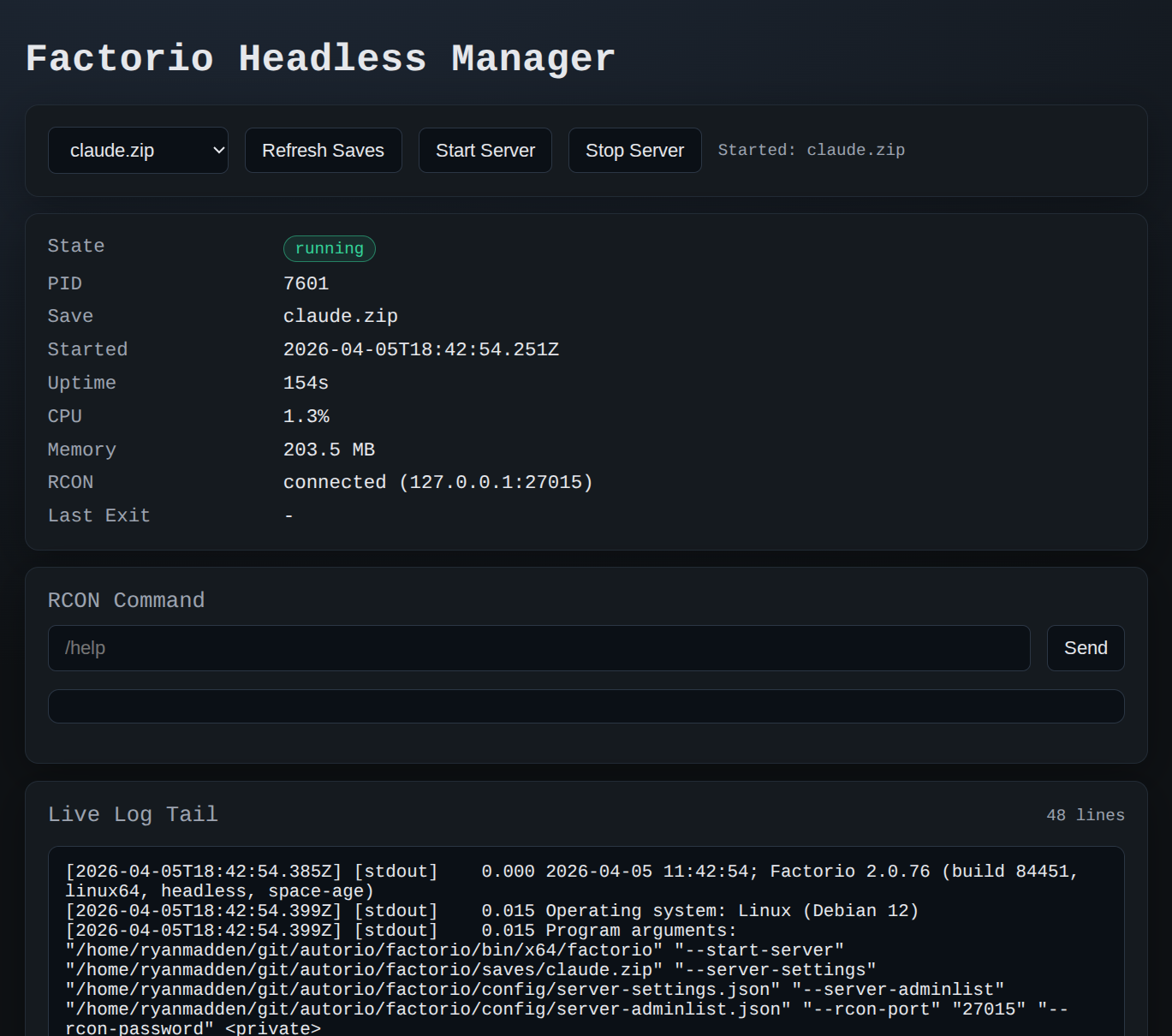
We could have implemented the Lua/RCON commands in the CLI, but instead we opted to build a TypeScript server to manage the game and send commands. We wanted extra abilities for monitoring and debugging that wouldn’t be included in the CLI: the ability to start and stop game servers, see the server status and logs, list and load saves, and send arbitrary RCON commands.
For convenience we also built a web UI to expose these affordances in a single view and a TypeScript API to wrap the Lua/RCON commands into a cleaner interface:
With the TypeScript server already encapsulating RCON commands in an API, it made sense to build the CLI on top of the server’s API to keep all the commands (which are messy) colocated. The current version of the CLI has the following commands:
ryanmadden@penguin:~/git/autorio$ factorio --help

factorio <command> [options]

Commands:
  server-status
  server-start --save <name>.zip
  server-stop
  server-saves
  observe-world --window-x <n> --window-y <n> --radius <n> --include tiles,entities
  observe-player --limit-inventory <n> --limit-equipment <n>
  observe-research --limit-available <n>
  observe-recipes --limit-recipes <n> [--unlocked-only]
  observe-entity --target x,y [--target ...] [--targets-json <json>]
  observe-resources --window-x <n> --window-y <n> --radius <n>
  observe-entity-prototype --name <entity-name>
  act-build --entity name,x,y,dir [--entity ...] [--entities-json <json>]
  act-mine --target x,y [--target ...] [--targets-json <json>]
  act-rotate --target x,y [--target ...] [--targets-json <json>]
  act-set-recipe --target x,y,recipe [--target ...] [--targets-json <json>]
  act-research --technology <name>
  act-craft --item <name> --count <n>
  act-insert --entity x,y --item <name> --count <n>
  act-extract --entity x,y --item <name> --count <n|all>
  wait --ms <n>

More help:
  Run: factorio <command> --help
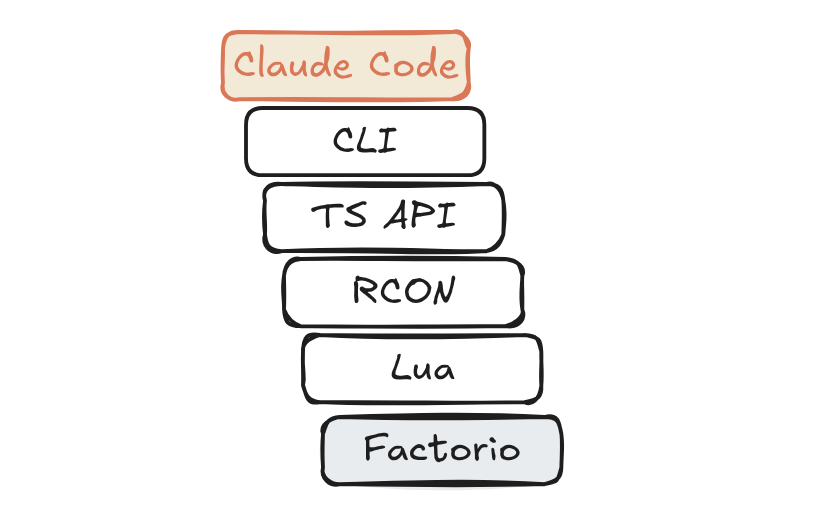
The final chain of communication from Claude to the game looks this:
Now Claude Code can play the game! Unfortunately, there’s one problem: we don’t have a way to watch Claude play.
You might’ve noticed that the web UI says ‘Factorio Headless Manager’. Factorio can be run as a headless server without the game’s graphical UI which is much less resource-intensive than running the full game client. This is very helpful, because running the full game client causes my laptop’s fan to blast off to the moon.
Why is that? Well reader, my daily driver is a 2022 Framework Chromebook. This beautiful machine falls a hair short of Factorio’s modest minimum requirements, especially in the graphics area. It can run the game at a middling frame rate but it can’t do much else while that’s happening so headless is the way to go.
To make matters worse, I don’t even have a Steam license for Factorio. I did those performance tests using the demo! I learned to love Factorio on my Nintendo Switch and it’s the only full version we had on hand.
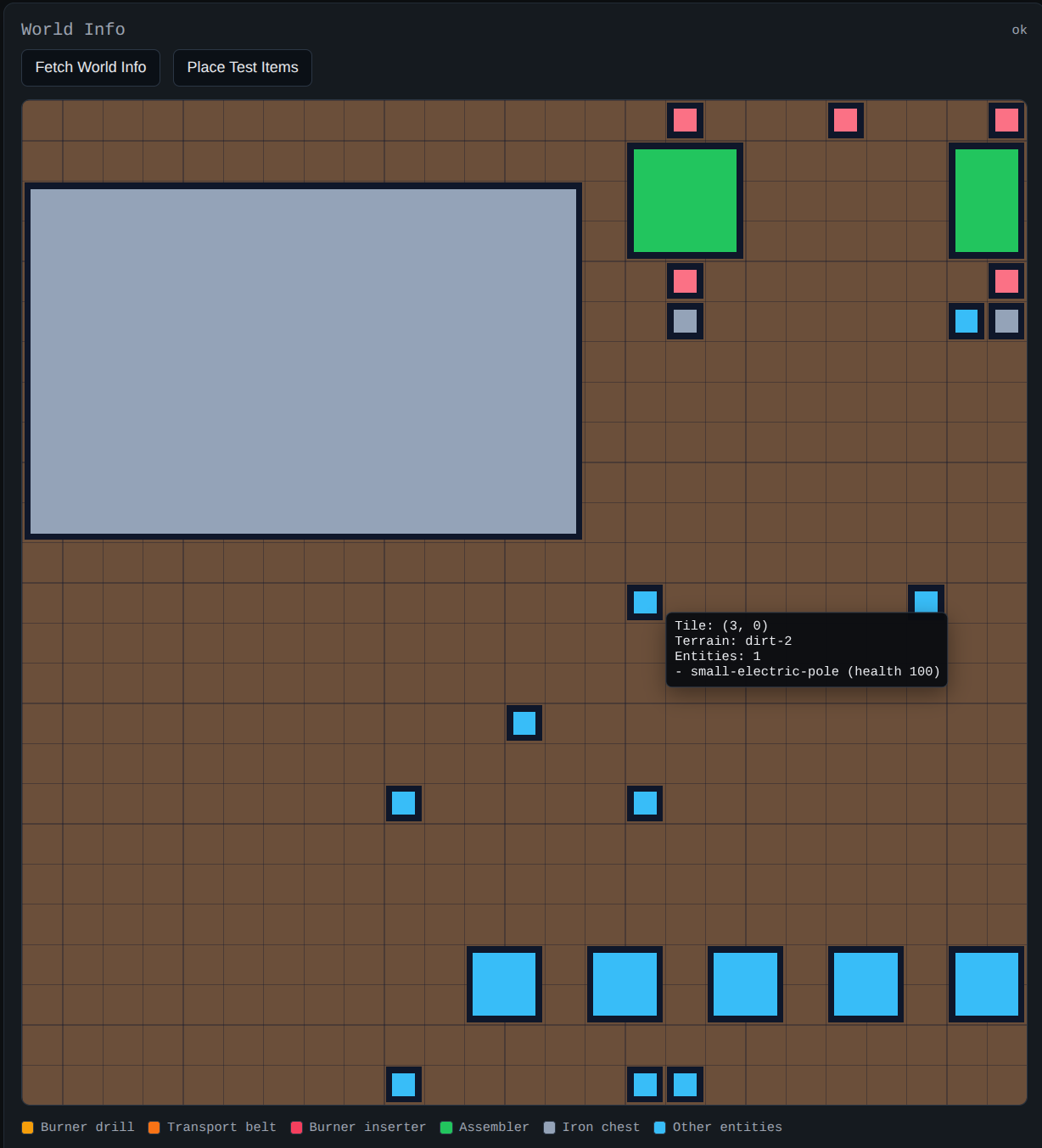
Originally our plan was to implement a basic renderer in the web UI to show where entities were on the grid, and we actually got part-way down that road:
But wait! We’re hosting a headless multiplayer server… my laptop and Switch are on the same network… can we join the game from the Switch and spectate on the TV?
Yes, yes we can, with a few simple steps:
- Downgrade the headless server Factorio version to the latest Switch release version
- Disable mods and the Space Age expansion for compatibility with the Switch version and create a new save file with those settings
- Configure the Chromebook’s port forwarding to expose the server (which is running inside a Linux VM)
- Use ‘join by IP’ with the laptop’s address and server port to connect from the Switch
The first time this worked I jumped off the sofa, it was awesome.
Now, could we have simply bought another license and run this all on Sam’s Macbook Pro? Yes. Is using the Switch unnecessary hoop jumping? Of course. But all of this is unnecessary hoop jumping. We are unnecessary hoop jumping for fun here!
The final architecture looks like this:
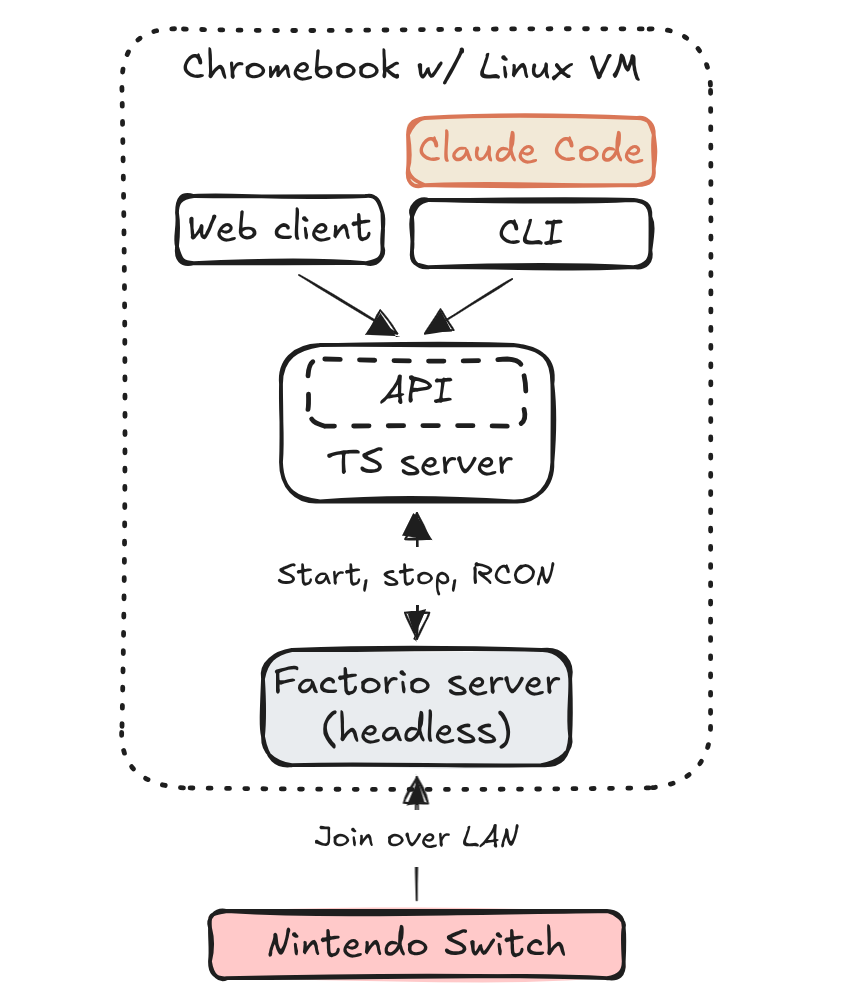
We implemented the entire thing using Codex, which I’ve enjoyed hacking with in my spare time. In the past, something like the RCON API would have been a huge headache and pushed us toward an existing open-source implementation. Instead, Codex can crank out exactly what we need and nothing extra. As a result, our implementation has zero dependencies!
Claude Code plays Factorio
With the CLI configured, we started up a fresh game save and launched Claude Code. The prompt was something like:
Your goal is to beat the game Factorio by launching a rocket into space. There is a Factorio server running which you can interact with using the
factorioCLI command. Runfactorio --helpto learn about the individual commands. Try to beat the game as quickly as possible by building an autonomous factory.
We did two major runs like this using Sam’s ‘Pro’ subscription. The first run quickly highlighted some gaps in our CLI: Claude was struggling to verify its setups because there was no way to inspect the state of an entity. For example, when trying to smelt iron plates, Claude was forced to run factorio act-extract to check whether there was coal in a particular furnace.
There was also no way to interact with the game’s research system. Besides the first two technologies, new research must be manually started in the research menu to progress the game.
Claude understood this and grew frustrated with the CLI at which point it took matters into its own hands. We had unwittingly run Claude in the project repo and it quickly located the TypeScript server API and began sending its own RCON commands with curl.
After letting it play for a while we stopped the run and asked Claude to review its progress, write up proposed changes for the CLI and write a plan to implement them. Then, we turned back to Codex in the repo to implement the changes.
Afterwards, we reset the game and did another, longer run (this time from a different directory).
Results
Claude made it surprisingly far in the game, completing several initial research objectives and manufacturing red and green science packs. It successfully configured an electrical system with multiple boilers and steam engines to power labs and assemblers.
It was halfway through the ‘automation 2’ research when we ended the second testing run. The final factory looked like this:
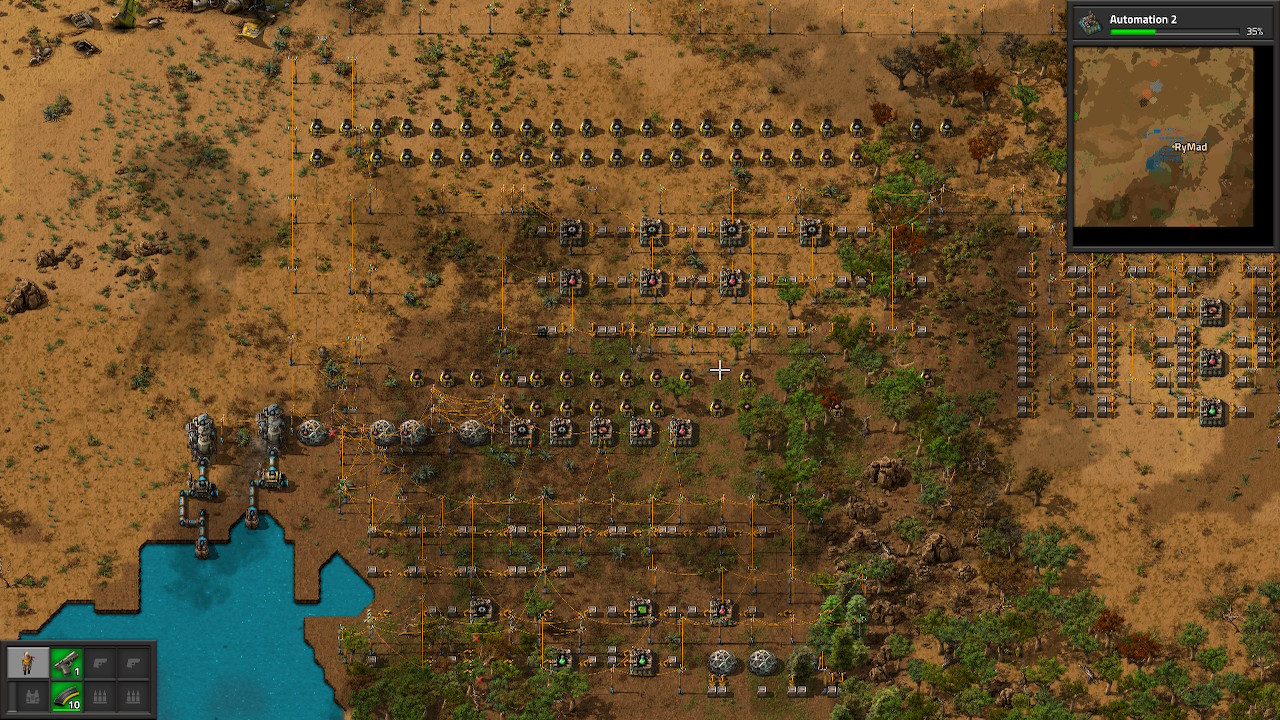
While this looks significant (and the electrical system was functional), many of the visible assemblers and inserters were never actually used. Claude had several tendencies which led it to repeatedly abandon areas of the factory:
- Rather than build a ‘prototype’ of a particular automation (e.g. furnace, inserter, assembler) and testing it before scaling, Claude would place multiple sets of items at once.
- Claude was reluctant to remove placed items and would instead simply move to an adjacent open area to try a new approach, even deforesting to clear space when necessary.
- Claude seemed to struggle to track whether sequences of entities were ‘hooked up’ correctly.
Claude was also very prone to using a particular ‘crate, assembler, crate’ configuration. This pattern appeared frequently:
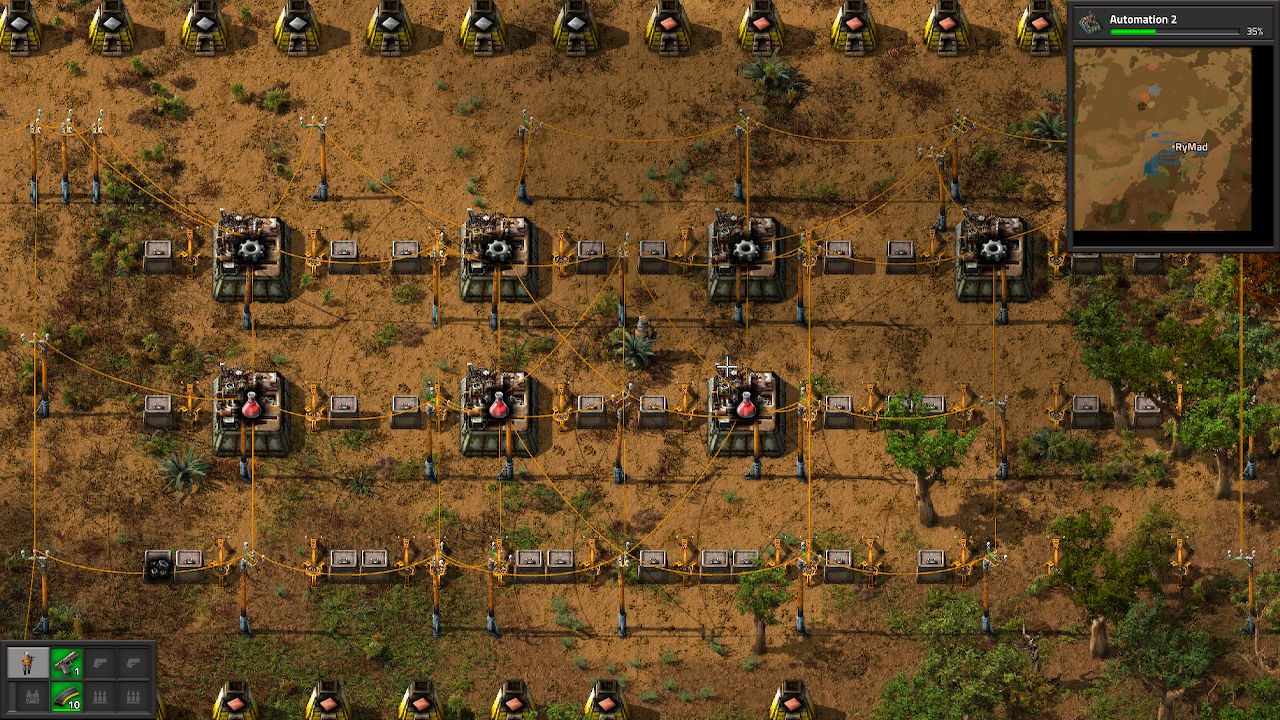
This, along with Claude’s avoidance of transport belts, may have been the fault of our implementation. While we tried to restrict Claude with the same constraints a human player would face, the CLI allowed it to ‘cheat’ in two key ways: Claude could access entities anywhere on the map without having to ‘walk’ the player character to them and mine entities without the typical ‘manual’ delay.
When combined with programmatic access, this allowed Claude to programmatically connect entities like furnaces and assemblers by manually moving items between them in a way that would be prohibitively slow for a human player. It also allowed Claude an unlimited supply of fuel and ore.
Claude took full advantage of these abilities to scale aggressively in the game’s early stages, laying out lines of stone furnaces and instantly filling them with ore and coal. We’ll obviously need to correct this in the future.
As predicted, Claude struggled with the spatial challenge of arranging multiple entities together. It took lots of trial and error to correctly configure a boiler, pipes, and steam engine to generate power and it often placed inserters in the wrong orientation.
Our current hypothesis is that prompting Claude to encapsulate successful geometrical arrangements discovered through trial and error could be enough to improve performance.
If you’re interested, the code is available on GitHub (though this is unreleased – buyer beware). More to come soon!